
Fill in a product’s marketplace data
The product’s marketplace fields hold values for definitions created in the marketplace field manager. These are separate from the product’s ordinary description, brand and GTIN fields.
Enter and review values
- Open Product Management and find the exact product and SKU.
- Choose Edit and open Marketplaces Data when available.
- Read each field’s label and any help description.
- Enter the intended short or longer text, or choose the appropriate Yes/No value.
- Check facts, units and spelling against the actual product.
- Use Save changes or Save changes & close for the intended update, then reopen the product and check the saved values.
- Review the relevant exported record and provider mapping before relying on a marketplace listing.
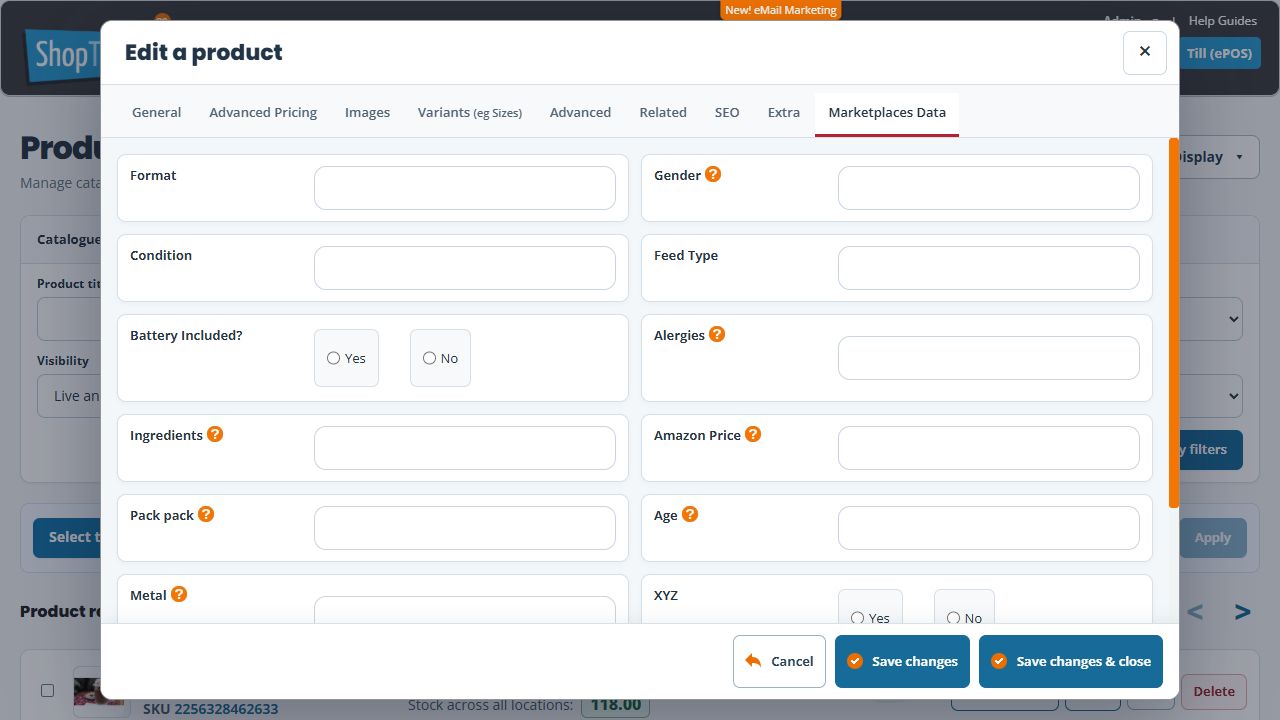
Example: a material attribute
For a bag’s Material field, enter the confirmed material of that exact item. Do not copy a value across a range when products differ. Review the actual variant/listing model separately where options have different attributes.
If the tab or field is absent
Check the intended shop, integration availability and field definitions. A definition must exist before a product can use its input. Do not add a duplicate definition just because an expected field is not visible.
If the marketplace value differs
Compare the saved product, selected source field, last catalogue result and actual provider value. Saving Builder product data alone does not confirm that an external listing has updated.
