
Split one till sale across payment methods
A split payment records more than one tender against the same sale. Keep track of money already received; a remaining balance is not a new basket.
Record the first part
- Check the intended basket and select PAY.
- Read the full To Pay amount.
- In Tendered, enter the portion being paid with the first method.
- Select that configured method and complete any payment-provider interaction it requires.
- Wait for its result. Check Paid and the remaining To Pay before doing anything else.
Complete the remaining balance
- Check that Tendered contains the amount intended for the next method.
- Select that method and wait for its outcome.
- Continue only for the remaining balance. When complete, inspect the individual tender amounts in the saved order details. Check receipt output separately: a layout may list method names without a separate amount for each tender.
Example: cash handed over in two parts
For a £12 sale, the customer first hands over £5. Enter 5.00 and choose Cash. Check that Receive Payment shows Paid £5.00 and To Pay £7.00. When the customer supplies the remaining £7, check Tendered is 7.00, then choose Cash again. Check the completed order and its two cash amounts.
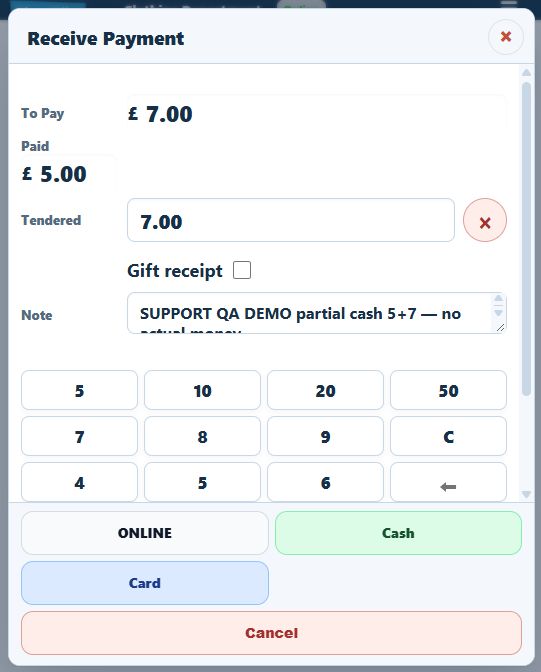
Example: £10 cash and £20 card
For a £30 sale, enter 10.00 and choose Cash for the £10 received. Confirm Paid is £10 and To Pay is £20. Only then proceed with the intended £20 card amount and verify the terminal and till results.
Restrictions and exceptional cases
Non-cash tenders are not a way to issue cash change from an over-entered amount. Account payments depend on customer eligibility and available credit. Voucher, return, estimate and zero-balance cases need their own verified workflow.
If the second payment fails or becomes uncertain
Preserve the existing paid amount and basket. Do not restart the whole sale or repeat the first tender merely because the second did not complete. Check the terminal/provider outcome for a card attempt and use its review screen when required.
