
Review and issue an order refund
Identify the original order and actual payment before starting. A return, cancellation, voucher credit and money refund can be different operations.
Review the original payment
- Find the intended order and check its number, customer, items and payment evidence.
- Review existing returns, exchanges, vouchers and refunds so you do not repeat an earlier outcome.
- Confirm the amount and intended refund method under your shop’s process.
- Choose Issue refund for the intended order when available.
Review the refund form
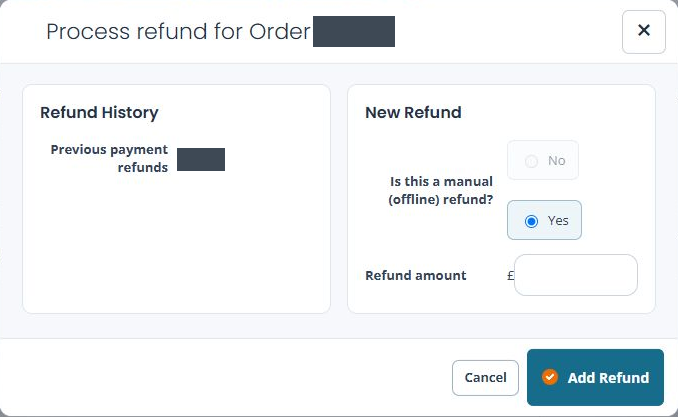
- Check the order reference in Process refund for Order.
- Read Previous payment refunds.
- Review Is this a manual (offline) refund?. The available choice depends on the order’s payment route.
- Enter the intended Refund amount and check it against the original payment and previous refunds.
- Review the exact method and amount before Add Refund. Use Cancel if you were only inspecting the form.
Manual and provider refunds
A manual refund records money handled outside this provider-refund action. It does not send money through the original payment provider. For a provider refund, confirm that the selected order/payment supports that route and check the actual provider result.
If the provider refund choice is unavailable
- Read the selected answer to Is this a manual (offline) refund?. On a cash order, the form can select Yes and disable No.
- Check the original payment evidence. Do not assume a disabled provider choice can be enabled by entering an amount, or that recording a manual refund will send money to a card.
- If the original payment should support a provider refund but the expected route is unavailable, use Cancel and ask support to check the order and payment references before continuing.
For example, money being returned from the cash drawer and money being refunded through a card provider require different evidence. Agree the actual money-handling step under your shop’s process before recording a manual refund, then check both the saved record and the actual money outcome.
Example: a partial amount already returned
If part of an order was refunded earlier, establish that amount and the remaining intended refund before adding another. Do not assume the form will prevent every duplicate or excessive refund.
After an intended refund
Check the order’s refunded amount, payment/refund records and events alongside the actual cash or provider outcome. Keep the order and provider references if the result is uncertain. Investigate before retrying; a missing receipt or unclear on-screen result is not permission to refund twice.
