
Cancel an order and review its stock outcome
Review what has already happened to the order before cancelling it. Goods, money, customer accounts, loyalty and connected marketplace records may each need separate checks.
Prepare the cancellation
- Find the exact order and check its current status, items, quantities and fulfilment.
- Review prior cancellations, returns, exchanges, payments and refunds.
- Confirm whether any goods are physically available to return to saleable stock.
- Agree the payment/refund and any connected-marketplace follow-up separately.
- Open the order’s cancellation action and check the order number in the confirmation.
Review the confirmation
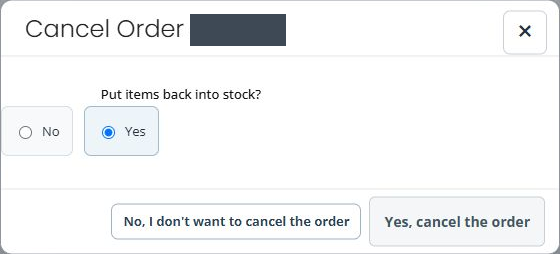
- Check the order number in Cancel Order before continuing.
- Choose Put items back into stock? deliberately. Read which of No or Yes is selected before confirming. A form can open with Yes already selected; this is not confirmation that the goods are physically available or saleable.
- Use No, I don't want to cancel the order to leave without confirming.
- Choose Yes, cancel the order only for the intended cancellation.
- Read the result, reopen the order and check its actual status and events.
Check related outcomes
Compare affected product/options and locations with the intended stock decision. Check any customer-account balance, loyalty result and marketplace cancellation separately. Cancellation is not confirmation that every payment route has returned money; inspect the actual provider or cash outcome.
Example: goods already dispatched
An order marked for cancellation may contain goods that have already left the shop. Do not put them into saleable stock merely because the order is cancelled. Agree the actual return and payment process first.
If part of the operation is unclear
Keep the order reference, result, selected stock choice and affected records for support. Check what already changed before retrying a cancellation or applying a manual stock or account correction.
Return versus cancellation · Refund review · Stock by location.
