
Use Builder Insights to investigate trading signals
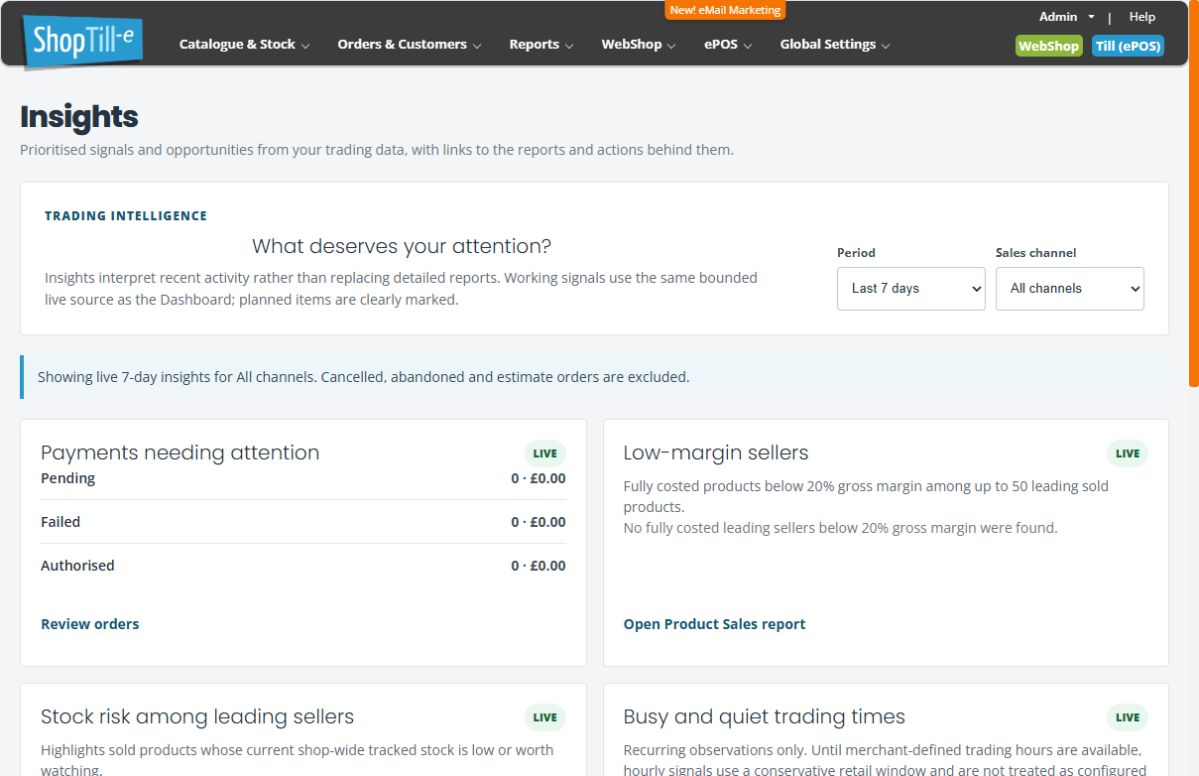
Insights highlights questions worth investigating in your recent trading data. It provides starting points and links to supporting reports rather than replacing record-level checks.
Choose the scope
- Open Reports → Insights Dashboard.
- Choose Period: Last 7, 14 or 30 days.
- Choose Sales channel: All channels, Webshop or ePOS.
- Read the status line confirming the selected scope.
- Review cards marked Live and follow their supporting report or order link.
Understand the signals
- Payments needing attention: use Review orders to inspect the actual records and outcomes.
- Low-margin sellers: the card’s definition describes fully costed products below 20% gross margin among up to 50 leading sold products. An empty card is not a catalogue-wide proof that every product has a healthy margin.
- Stock risk: the card considers current shop-wide tracked stock for leading sellers; review the relevant product and location.
- Busy and quiet trading times: read any insufficient-data message. Distinguish recurring trading patterns from the shop’s configured opening times when interpreting this card.
Planned cards
Cards labelled Planned describe future work. They are not available actions or evidence that the feature has been delivered. Use the working report links for current investigations.
Example: investigate a low-margin item
Open Product Sales for the supporting detail, then check the product’s price and recorded costs. Confirm the period and channel before comparing it with a different report or a current catalogue price.
Read Dashboard figures · Run product sales reports
Check the selected scope after refresh
Choose Period and Sales channel, wait for the loading message and check the resulting scope text. If an unavailable or error message appears, do not treat missing cards as zero activity. Use the linked Product Sales, Stock Holding, Replenish or Daily Totals report and review that report’s own filters.
Keep the period, channel, signal and relevant product or order reference when asking about a difference. A ranking or risk signal is a starting point for investigation rather than a complete ledger or provider outcome.
